
Flip Case Control2.13 - Google Play
You'll be able to see results in few seconds.
Publisher Description
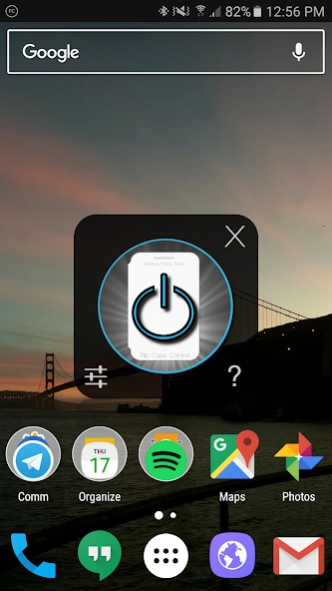

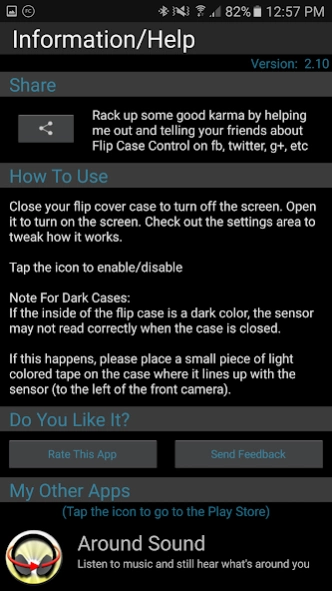
Flip Cover Case Automatic Screen On/Off
Close the Flip Cover case and the screen turns off. Open the Flip Cover Case and the screen turns on.
That's the way it should be and now it's here.
Tested on Galaxy S7 and Nexus 5X
Currently not compatible with non-Samsung ROMs (AOSP/CM)
IMPORTANT: If your case is black or dark on the inside, the sensor may not read correctly when the case is closed. To fix this, put a piece of light colored tape on the inside of the case where it lines up with the sensor (located next to the front camera)
If you have a Note II and you're experiencing high battery use: turn off "Reduce Sensitivity" I'm working on a fix.
Frequently Asked Questions:
Q. Does it use a lot of battery?
A. On my test phones, it comes in around 0.3-0.5% per hour depending on usage.
Q. Is the sensor on all the time?
A. It can be, if you don't want it to be then try Night Disable or Limited Screen On to disable it.
Q. Is that bad to leave the sensor on all the time?
A. No, the sensor is just a passive light sensor paired with an LED. It's ok to let the LED run.
Q. Can my phone still reach the "Deep Sleep" state?
A. Yes.
Q. Sometimes the screen takes a little bit longer to turn on after opening the case, is something wrong?
A. No, that's normal. The phone has powered down to the "Deep Sleep" mode and takes a little bit of time to wake up.
Permissions Needed:
Get Settings - Needed for core functionality
Wake Lock - Needed for core functionality
On Boot - Auto start on boot up
(Optional) This app uses the Device Administrator permission. - Screen Lock: Used as an alternative method to turn off the screen if the default one does not work. It will need to be disabled prior to uninstalling the app if used.
About Flip Case Control
The company that develops Flip Case Control is MarksThinkTank. The latest version released by its developer is 2.13.
To install Flip Case Control on your Android device, just click the green Continue To App button above to start the installation process. The app is listed on our website since 2017-08-20 and was downloaded 0 times. We have already checked if the download link is safe, however for your own protection we recommend that you scan the downloaded app with your antivirus. Your antivirus may detect the Flip Case Control as malware as malware if the download link to com.MarksThinkTank.FlipCaseControl is broken.
How to install Flip Case Control on your Android device:
- Click on the Continue To App button on our website. This will redirect you to Google Play.
- Once the Flip Case Control is shown in the Google Play listing of your Android device, you can start its download and installation. Tap on the Install button located below the search bar and to the right of the app icon.
- A pop-up window with the permissions required by Flip Case Control will be shown. Click on Accept to continue the process.
- Flip Case Control will be downloaded onto your device, displaying a progress. Once the download completes, the installation will start and you'll get a notification after the installation is finished.
Program Details
System requirements
Download information
Pricing
Version History
version 2.13
posted on 2017-08-20
Added notice about Device Administrator Policy: Lock the screen - per Google guidelines
version 2.11
posted on 2016-11-19
V2.11: Bug Fixes...,V2.10: Updated to work on modern phones. Tested on Galaxy S7,V1.26: Reverting back to this version until Note 2 issues fixed on V2.0x,V2.0: Huge update:,New UI,New Sensing Method,New Method to turn off the screen,New Battery Saver Options,New Status Bar Icon Option,Let me know how you like the updates and if anything broke! Hit the Send Feedback button in the Help area
version 1.26
posted on 2013-04-09
Several fixes and updates
Disclaimer
Official Google Play Link
We do not host Flip Case Control on our servers. We did not scan it for viruses, adware, spyware or other type of malware. This app is hosted by Google and passed their terms and conditions to be listed there. We recommend caution when installing it.
The Google Play link for Flip Case Control is provided to you by apps112.com without any warranties, representations or guarantees of any kind, so access it at your own risk.
If you have questions regarding this particular app contact the publisher directly. For questions about the functionalities of apps112.com contact us.
